Write a spec,
ship an agent
From plain English to production agent in 60 seconds: tested, versioned, and ready to call from anywhere





Write specs, not flowcharts
What you write is what your agent does.
Your spec defines behavior, inputs, and outputs. No frameworks, no SDKs, just words.
Pick a starting point, or fork one and build your own
Control, not complexity
Test every change before it ships
Test every change before it ships
Every agent ships with a built-in test harness. Define expected outputs, run your suite on save, and catch regressions automatically.
- ●Inline test cases with expected output matching
- ●Automatic regression detection on every edit
- ●CI/CD integration via API for automated pipelines
Previously required: Braintrust, Promptfoo, custom eval scripts
Iterate on specs, ship stable APIs
Iterate on specs, ship stable APIs
Every spec change is versioned, diffed, and reversible. Engineers get stable APIs while non-engineers update agent logic through approval workflows, without redeploying or managing prompts in a separate tool.
- ●Git-like version control with transparent diffs and instant rollback
- ●Immutable versions with version pinning
- ●Approval workflows for non-technical spec editors
Previously required: PromptLayer, HumanLoop, Custom Pipelines, Manual Versioning
Ship once, deploy everywhere
Ship once, deploy everywhere
Every agent can be exposed as a strictly typed REST API the moment you save it. Logic auto-generates docs, input forms, and a shareable web UI from your spec.
- ●Strictly typed inputs and outputs enforced on every request
- ●Auto-generated API docs and integration guides from your spec
- ●Shareable web UI with input forms anyone can use
- ●MCP server for native AI tool integration (Claude, Cursor, ChatGPT)
- ●Batch processing: run any agent against an entire CSV dataset
Previously required: Custom frontend, API documentation tools, Swagger/OpenAPI
Intelligent model routing with zero setup
Intelligent model routing with zero setup
Logic routes each request across OpenAI, Anthropic, Google, and Perplexity, matching fast models to simple tasks and frontier models to complex reasoning. Failover is automatic.
- ●Automatic model selection by task complexity, latency, and cost
- ●Automatic failover if a provider returns errors or goes down
- ●Execution caching for deterministic workloads (same input, instant result)
Previously required: OpenRouter, Martian, Custom routing logic
See exactly what your agents are doing, and why
See exactly what your agents are doing, and why
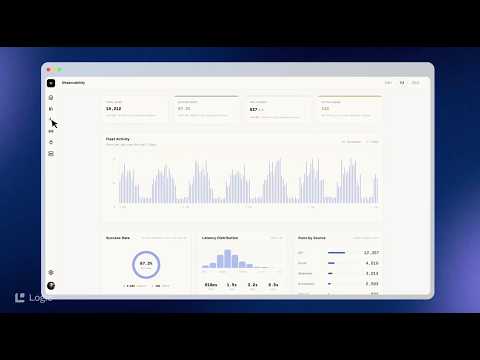
Every execution is logged with full context: inputs, outputs, model reasoning, latency. When something breaks, you know exactly where and why.
- ●Complete execution logging for every API call
- ●Full input/output inspection with latency tracking
- ●Error surfacing and execution history across all agent versions
Previously required: LangFuse, LangSmith, Custom Logging
Control, not complexity
Test every change before it ships
Test every change before it ships
Every agent ships with a built-in test harness. Define expected outputs, run your suite on save, and catch regressions automatically.
- ●Inline test cases with expected output matching
- ●Automatic regression detection on every edit
- ●CI/CD integration via API for automated pipelines
Previously required: Braintrust, Promptfoo, custom eval scripts
Iterate on specs, ship stable APIs
Iterate on specs, ship stable APIs
Every spec change is versioned, diffed, and reversible. Engineers get stable APIs while non-engineers update agent logic through approval workflows, without redeploying or managing prompts in a separate tool.
- ●Git-like version control with transparent diffs and instant rollback
- ●Immutable versions with version pinning
- ●Approval workflows for non-technical spec editors
Previously required: PromptLayer, HumanLoop, Custom Pipelines, Manual Versioning
Ship once, deploy everywhere
Ship once, deploy everywhere
Every agent can be exposed as a strictly typed REST API the moment you save it. Logic auto-generates docs, input forms, and a shareable web UI from your spec.
- ●Strictly typed inputs and outputs enforced on every request
- ●Auto-generated API docs and integration guides from your spec
- ●Shareable web UI with input forms anyone can use
- ●MCP server for native AI tool integration (Claude, Cursor, ChatGPT)
- ●Batch processing: run any agent against an entire CSV dataset
Previously required: Custom frontend, API documentation tools, Swagger/OpenAPI
Intelligent model routing with zero setup
Intelligent model routing with zero setup
Logic routes each request across OpenAI, Anthropic, Google, and Perplexity, matching fast models to simple tasks and frontier models to complex reasoning. Failover is automatic.
- ●Automatic model selection by task complexity, latency, and cost
- ●Automatic failover if a provider returns errors or goes down
- ●Execution caching for deterministic workloads (same input, instant result)
Previously required: OpenRouter, Martian, Custom routing logic
See exactly what your agents are doing, and why
See exactly what your agents are doing, and why
Every execution is logged with full context: inputs, outputs, model reasoning, latency. When something breaks, you know exactly where and why.
- ●Complete execution logging for every API call
- ●Full input/output inspection with latency tracking
- ●Error surfacing and execution history across all agent versions
Previously required: LangFuse, LangSmith, Custom Logging
Garmentory
How Garmentory cut product moderation time from five days to 48 seconds
Garmentory, an online fashion marketplace, scaled from 1,000 to 5,000+ products moderated daily and had their best financial quarter in company history.
Read the full storyWhat our customers say
“A year ago, we were using almost no AI. Today, we're exploring using it in every part of our business. Logic made that jump possible.
Sunil Gowda
CEO, Garmentory
“On those more complex POs, Logic takes my work from half an hour down to two minutes. That's a massive time saver.
Lauren Gettler
Operations Manager, DroneSense
Frequently asked questions
Ship your first agent in 60 seconds
Start free. No credit card required.
SOC 2 Type II - HIPAA Certified - 99.9% Uptime SLA